> For the complete documentation index, see [llms.txt](https://paycheck-labs.gitbook.io/checks-whitepaper/llms.txt). Markdown versions of documentation pages are available by appending `.md` to page URLs; this page is available as [Markdown](https://paycheck-labs.gitbook.io/checks-whitepaper/examples/check-minting.md).
# Check Minting
Jake Pays Rent with a Payment Check
## Introduction
To help illustrate how the Checks Platform works in practice, this brief walkthrough provides an example of minting a Payment Check. Rather than focusing only on abstract features, this tutorial follows a real scenario in which a tenant, Jake, pays his monthly rent to Fairmont Apartments using a Payment Check. By following Jake’s process step by step, you can see how easy it is to create, collateralize, and deliver a check that is enforceable and verifiable on-chain.
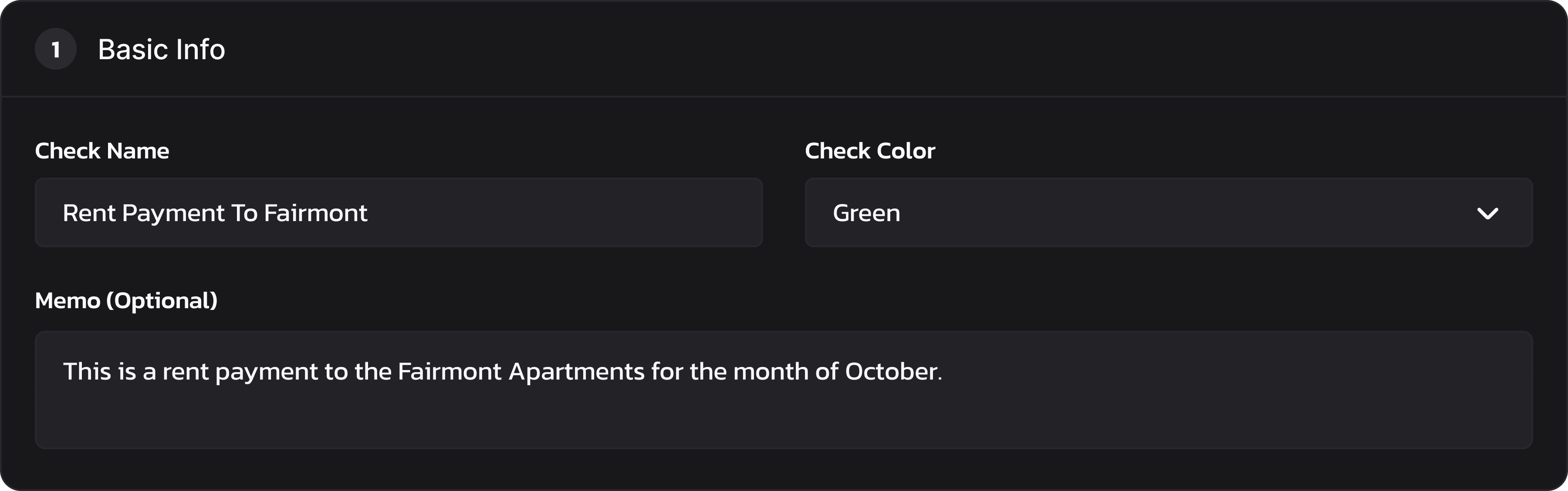
#### Step 1: Entering Basic Info
Jake begins by entering the basic details of the Payment Check. He names it “Rent Payment to Fairmont” so it is clear what the check is for, and he chooses a green color for easy visual recognition by the recipient. He also writes a short memo noting that the payment covers October’s rent. These details don’t affect the contract itself but help the receiver organize and identify the check later in their portfolio.
Basic Info
#### Step 2: Distribution Strategy
Next, Jake configures how the check will be distributed. He selects the Payment option, enters Fairmont’s wallet address, and adds a reference number to match his lease account. Because this is a standard rent payment, he chooses Instant Claim so the funds are available immediately. The category is set to Rent / Lease, and expiration handling is configured as Return to Sender after October 30, 2025. This gives the landlord plenty of time to claim it.
The interface automatically generates a timeline: minting, transfer, and claimable status, all scheduled for the same day. If Jake had chosen Post Dated, the check would still be delivered instantly to Fairmont but remain locked until the release date. For this example, however, everything is available on the same day the check is minted.
Distribution Strategy
#### Step 3: Collateral
Jake then chooses which asset and how much to lock into the check. Since Fairmont requested payment in USDT on Binance Chain, he selects Tether (USDT) as the token and sets the collateral amount to 1,675.90 USDT. The system automatically calculates a platform fee of 0.84 USDT (0.05%) along with an estimated gas fee in BNB. Once confirmed, these funds are locked into the check contract and secured on-chain.
Collateral
#### Step 4: Preview
Before finalizing, Jake reviews the Payment Check Preview. The preview shows all details at a glance: the collateral amount, payment type, chain, sender and recipient addresses, and expiration rules. Everything looks correct, including the amount, the recipient, and the expiration, so Jake proceeds.
Preview
#### Step 5: Transaction in Process
After clicking Mint Now, the transaction is broadcast to the network. A short progress window appears, letting Jake know the check is being finalized on-chain. Within a few moments, the check is fully minted and confirmed by the blockchain.
Transaction in Progress
#### Step 6: Transaction Success
Finally, Jake receives confirmation that his Payment Check has been minted successfully. The check is now visible in Fairmont Apartments’ wallet, where they can view and redeem it through their portfolio interface once received. Jake can still copy or share the check’s QR code for verification, but ownership resides with the landlord from the moment of minting. This ensures the funds are secured and accessible only to the intended recipient.
Transaction Success
***
## Conclusion
This example demonstrates how Checks transform routine financial obligations into secure, on-chain agreements. For Jake, paying rent is as simple as filling out a few fields, selecting the right options, and confirming the transaction. For Fairmont Apartments, receiving the Payment Check provides instant assurance that funds are secured and verifiable without relying on banks or third-party processors.
The process combines the familiarity of traditional checks with the advantages of blockchain technology. Each step is clear and transparent, while automation ensures that payments cannot be altered, lost, or disputed once minted. The check resides in the recipient’s wallet, where it can be redeemed under the conditions set at creation. Even simple transactions like rent or utilities gain the benefits of programmable finance, including expiration handling and secondary transferability.
By walking through Jake’s rent payment, we see how Payment Checks fit seamlessly into real-world scenarios while offering more flexibility and security than traditional methods. From individuals to enterprises, the ability to mint enforceable agreements directly on-chain opens the door to a more trustworthy, transparent, and efficient financial system.

.png?alt=media&token=26f285d6-aad0-4abe-9373-f22448fb14a0)


