> For the complete documentation index, see [llms.txt](https://paycheck-labs.gitbook.io/checks-whitepaper/llms.txt). Markdown versions of documentation pages are available by appending `.md` to page URLs; this page is available as [Markdown](https://paycheck-labs.gitbook.io/checks-whitepaper/examples/check-claiming.md).
# Check Claiming
Fairmont Claims Jake’s Payment Check
## Introduction
To complete the example from the previous section, this walkthrough shows how Fairmont Apartments receives and claims the Payment Check that Jake minted for rent. This scenario demonstrates the recipient’s experience and highlights how a business or individual can easily verify, claim, and manage funds directly through the Checks Platform. By following Fairmont’s perspective step by step, you can see how funds move securely from the NFT Check to the recipient’s wallet through a few simple on-chain actions.
#### Step 1: Viewing Check in the Portfolio
When Fairmont logs into their portfolio, the new Payment Check appears under the Payment tab. The card labeled “Rent Payment to Fairmont” clearly identifies the source and purpose of the check. The portfolio dashboard summarizes essential details such as total account value, tokens managed, and available funds to claim. Fairmont selects the Manage Check button to view the full breakdown of Jake’s payment and proceed to the claim screen.
User Portfolio
#### Step 2: Reviewing the Check Details
On the overview page, Fairmont can see every element of the Payment Check:
* Token type (Tether USDT)
* Blockchain (Binance)
* Collateral amount (1,675.90 USDT)
* Minter address (Jake)
* Recipient address (Fairmont)
* Claim type (Instant)
* Mint date (September 30, 2025)
The Payment Check on the right provides a complete visual summary of the agreement. It displays the check’s QR code for on-chain verification and a concise snapshot of its essential details, confirming that the funds are securely locked and ready for claim. The design mirrors the look and feel of a real check, reinforcing trust and clarity for the recipient. Below the visual, the progress timeline shows each completed stage, indicating that the check has been minted, delivered, and is now awaiting redemption.
Overview
#### Step 3: Switching to Claim Tokens Tab
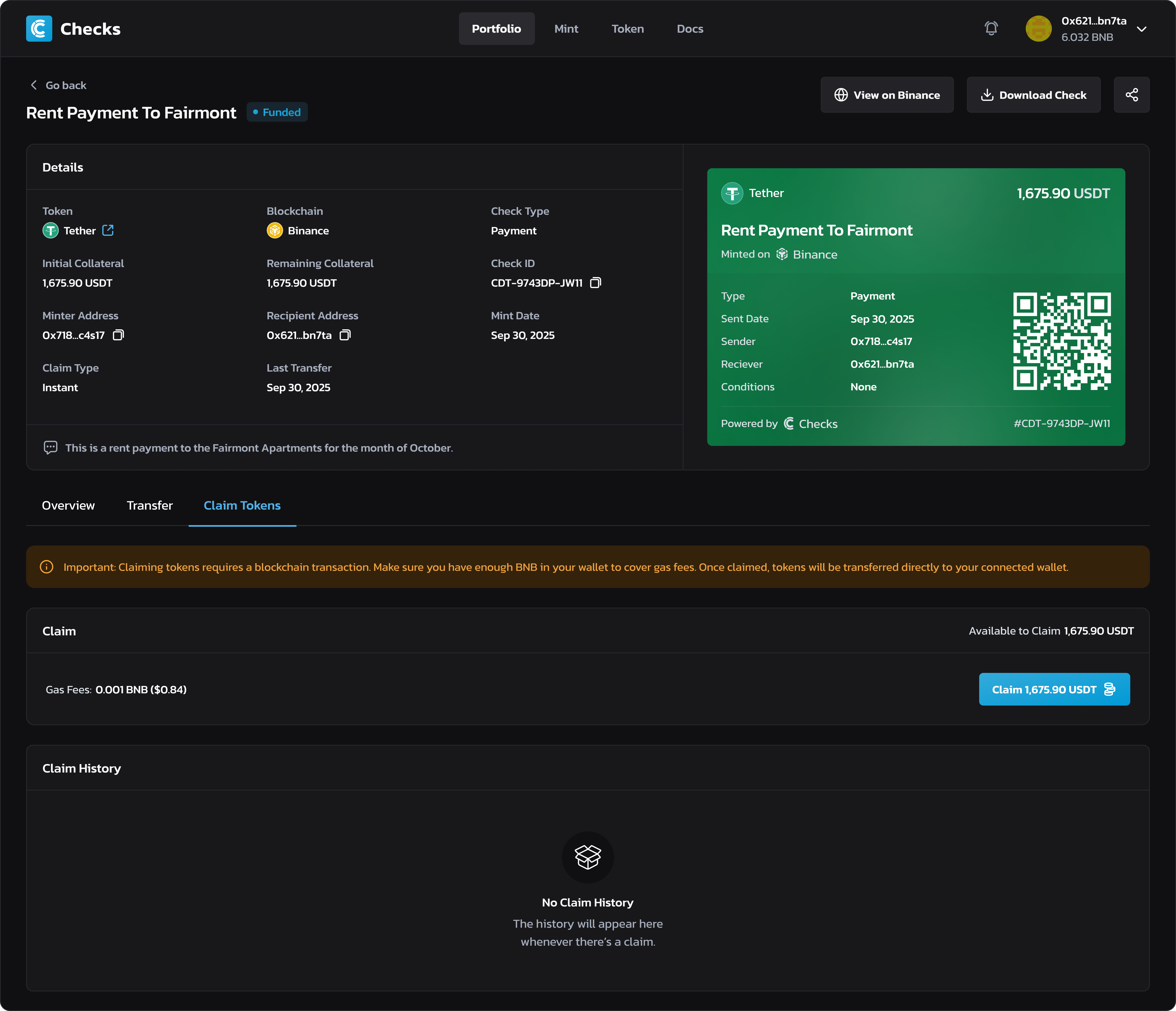
Fairmont opens the Claim Tokens tab to initiate redemption. A message reminds them to keep enough BNB in their wallet to cover gas fees. The interface automatically calculates the required fee, approximately 0.001 BNB, and shows the available balance of 1,675.90 USDT ready for claim.\
Once everything looks correct, Fairmont clicks the Claim USDT button to begin the process.
Claim Tokens
#### Step 4: Transaction in Process
Immediately after submitting the claim, a confirmation window appears showing that the transaction is in progress. The Checks smart contract handles the on-chain transfer, moving the collateral from the check to Fairmont’s connected wallet. During this short wait, MetaMask prompts Fairmont to approve the transaction, just as Jake experienced when minting. Within seconds, the claim is finalized on the blockchain.
Transaction in Progress
#### Step 5: Claim Successful
Once confirmed, a success window appears with the message “Check is Claimed Successfully.” The interface provides quick links to view the check on Binance or return to the portfolio. The check’s state automatically updates to reflect its new status, now claimed and completed.
Claim Successful
#### Step 6: Reviewing the Claimed Check
Back in the portfolio, Fairmont can now see that the collateral balance for the “Rent Payment to Fairmont” check is 0 USDT, meaning the funds have been transferred successfully to their wallet. A new entry appears in the claim history section, logging the transaction hash, date, and claimed amount.\
The check itself remains as a verified record of payment, serving as both a receipt and proof of transaction stored permanently on-chain.
Check Review
***
## Conclusion
This example completes the full cycle of a Payment Check, from minting by Jake to claiming by Fairmont Apartments. The process demonstrates how Checks enables transparent and direct financial interactions between senders and recipients. For Fairmont, claiming funds is quick and verifiable, requiring only a few clicks and a single on-chain confirmation. For Jake, it ensures that the payment remains secure, traceable, and accessible only to the intended recipient.
Behind this simplicity lies a powerful layer of automation. Each claim executes a verified smart contract action that transfers collateral directly, without intermediaries or delays. The blockchain provides immutable proof of payment that both parties can independently verify, removing the need for manual reconciliation or third-party validation.
By managing every stage within a single platform, Checks transforms a familiar financial act into a seamless digital experience. The result is faster settlement, stronger accountability, and greater confidence for individuals and organizations alike. Whether used for personal or business payments, the same process applies, offering a safe, instant, and permanently recorded method of on-chain payment.